Google Ads Fundamentals.

Ever wonder how the ads you see on google are created? Well, I do. And this blog will provide you with the insights of basic “Google Ads Fundamentals.

What are Google Ads?

According to “Google Ads Fundamentals” course, it is defined as an “online advertising tool that helps businesses connect with their customers” (Academy for Ads,2017).

You create your online ad, tell Google Ads who you want to reach, and Google Ads brings your ads to them” (Academy for Ads,2017). 

Let’s Talk Benefits

  1. Connect with customers when it matters– It targets the right crowd, at the right time. 
  2. Control your costs– It gives you the ability to have control over your budget and you get to pick how you want to spend your money.
  3. Improve performance – Google lets you see how your ad is performing by its’ tracking tools that shows you what percentage of people visited your website and actual sales your website is generating as a direct result of your ads.

Where can your customers see your Ads?

Google Ads are split into 2 networks:

  1. Google Search
  2. Google Display

Google search networks partners with Google, they include Google Search, Google Shopping, Google Maps, and Google Play. On the other hand, Google Display teams up with partnering websites that aid in similar search results. These sites include YouTube, Blogger, and Gmail (“Academy for Ads”, 2017). 

There are multiple formats on the Google Network

Text Ads – 
The most common kind of Search ad includes a descriptive headline, website URL, and descriptive text like a call to action.

Ads with Extensions – 
Ad extensions provide additional information to your text ad, such as your business’s address or phone number.

Responsive Ads –

The Display Network offers ads that adjust to match the pages and apps that show them. Viewers are more likely to see these ads because they blend in with the content the viewers came for. Responsive ads can go a long way to help build awareness, influence consideration, and drive action.

Shopping Ads – 
In addition to an image, Shopping ads contain product and pricing information, so users get a strong sense of the product you’re selling before they click your ad. They’re ideal if you’re managing a large inventory of products.

Image Ads – Image ads capture people’s attention as they browse websites in the Google Display Network.

Video Ads – Video ads are just what they sound like — a standalone video ad or a video ad that runs inside another streaming video.

*Video ads show on search partner networks, but not the Google Search Network.

App Promotion Ads 

App promotion ads send your customers to an app store to download your app, or include a deep link directly into your app.

Call-only Ads – 
Call-only ads allow your customers to call your business directly by clicking on your ad. They’re useful for driving phone calls to your business from devices that can make calls.

Rich Media Ads – 
Rich media ads are engaging ad formats that often include animation or other types of motion.

Create Effective Texts

Text ads, “The most common kind of Search ad includes a descriptive headline, website URL, and descriptive text (description) like a call to action” (“Academy for Ads”, 2017). To make sure your text ad is effective, make sure to:

Tips on writing the perfect Text Ad:

  • Highlight what makes you unique 
  • Use a call to action
  • Include sales terms
  • Match the ad to your keywords
  • Match the ad to your landing page

Enhance your Ad with Extensions

If you want to grab your audience’s attention, Ad extensions are a good way to do so because it gives individuals more reason to pick you business. And a on the plus side, there is no fee to set up a Ad extension.

Sitelink extension: direct to a specific page of your website (hours).

Callout extension: add additional text.

Structured snippets: highlight specific aspects of your products or services.

Location extension: direct people to physical locations (stores).

Call extension: adding a phone # for people to call.

Message extension: adding a # for people to text.

Price extension: showcase categories with their prices

Promotion extension: highlight specific sales (40% off).

App extension: link to your mobile apps.

Choose the Right Campaign Type

The important part of creating an Ad is knowing your advertising goals and then you can pick the right campaign to achieve it.

Step 1

  • Search campaign
  • Display campaign
  • Search campaigns with display opt-in
  • Video campaign
  • Shopping campaign
  • Universal App campaign

Step 2

  • Select objectives for your campaign

Step 3

  • Campaign name
  • Campaign type Networks (partner sites)
  • Devices Locations & Languages
  • Bidding
  • BudgetAd extensions

A good campaign helps your business make changes quickly, target your ads effectively, and reach your advertising goals as a result.

Organize your Account for Success

A business must have an organized campaign and know the 3 “layers” of Google Ads that will help their business practices (“Academy for Ads”, 2017).
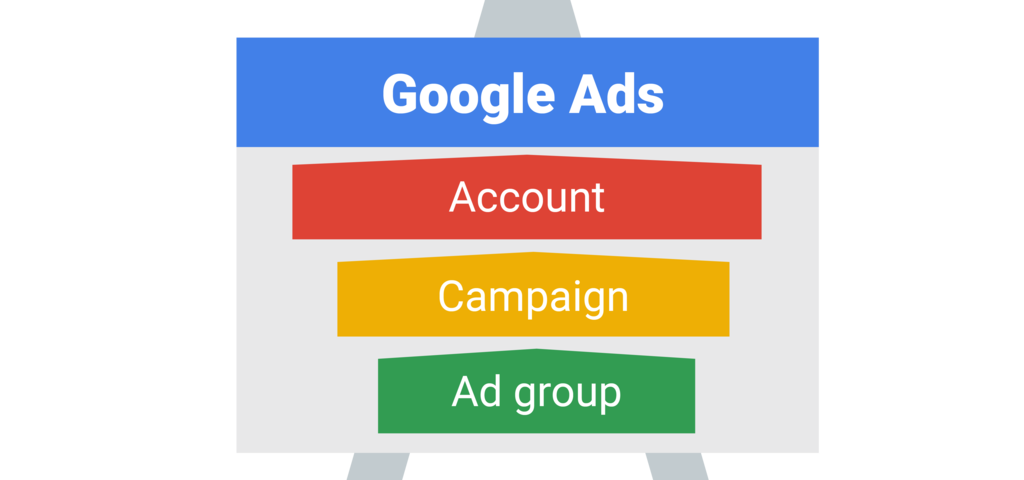

Account: It should be a unique email address and password along with billing information.

Campaign: Have a budget and settings that determine where your ads appear.

Ad Group: It contains a set of similar ads along with keywords (phrases or words that are relevant to your ads).

To keep on the right track, make sure to:

  • Create separate campaigns for different areas
  • Create separate ad groups with relevant keywords
  • Explore Google Ad manager if your juggling multiple accounts

Reach Customers with Targeting

At this point in time, you should have a campaign type and your business objective in mind.

When targeting audience you should think:

WHO – is in your targeted audience?

WHERE– your audience is?

WHAT– is of interest to your audience?

Help Customers Find You

Keywords are a great tool to reach potential or current customers. Because the point of keywords is for your customers to find you easily. Here is how you make them effective:

  • Think like a customer when you create a list.
  • Organize keywords by them Specific keywords target specific customers
  • General keywords attract more people.
  • Use negative keywords – that aren’t relevant to your product or service.
  • Pick the right number of keywords.

Control Which Searches Trigger your Ads

When customers search for or visit a website with terms in your keyword list they can see your ad. This match is done broadly by default so your ad can show to the largest possible audience (Academy for Ads, 2017).

The Solution is – Match types (which variations of your keywords cause your ad to show).

Broad match – includes all keywords, close variations, synonyms & misspellings.

Setup: leave as default (no changes)

Broad match modifier – same as the broad match but excludes synonyms (more targeted).

Setup: add a plus sign (+) sign before each term (word)

Phrase match – ads based on exact phrases & close variations.

Setup: add quotes(“ ”) around terms

Exact match – ads based on exact keywords & close variations.

Setup: add brackets[ ] around terms

Negative match – prevents ads from showing specific term related to search (excludes those keywords).

Setup: add a minus sign (-) before terms

The impact of ad formats you have enabled, your ad’s expected clickthrough rate (CTR), ad relevancy, and finally, the landing page experience when users click on your ad are all infuential (Academy for Ads, 2017).

Make your Ads Seen
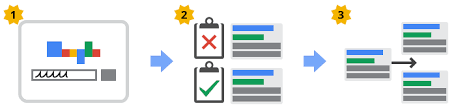
  1. Google Ads auction – considers what’s relevant & what’s high on Ad Rank.
  2. Ad Rank– considers the bid amount, expected clickthrough rate (CTR), landing page, ad relevancy & ad formats. All of these factors affect your quality score and determined your ad placement on a certain page (“Academy for Ads”, 2017).  

Match media cost models with your budget

Lets talk about the different cost methods for your advertisements.

CPM – Plaster ads all around the internet (pay the same price, regardless if people see it or not). It helps raise brand awareness.

vCPM – Only pay when ads are in visible areas (costs a little more, but people relevant see them). It raises brand awareness but only pay for impressions measured as viewable.

CPC – When someone clicks on your website you pay. It drives traffic to the site.

CPV – Same as CPC, but they watch a video. It increases views of the video.

CPA – Only pay when a customer does something you want them to for example, sign ups or they purchase a product). It helps increase the sales.

Determine a good bidding strategy

Google Ads gives you several ways to bid for your ads. Depending on which networks your campaign is targeting, and whether you want to focus on getting clicks, impressions, or conversions, you can determine which strategy is best for you (Academy for Ads, 2017).

There are two main ways a business can manage their bidding in Google Ads.
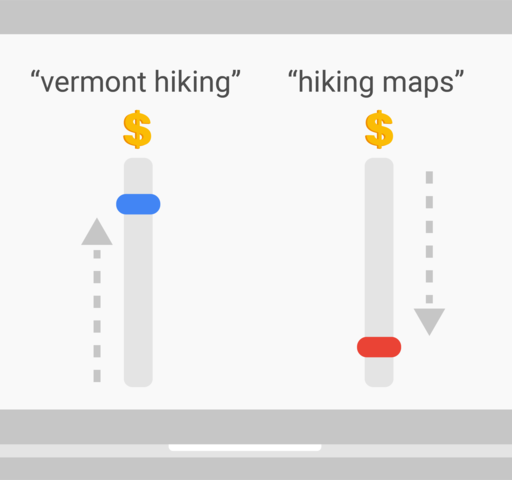
  • Manual bidding – YOU control the bidding

  • Automated bidding – Google Ads controls it for you

Basically, Google Ads direct you to use the “cost-per-click” (CPC) bidding (Academy for Ads, 2017). 

Tools to help you determine what to set your CPC, are as follows:

  • Bid simulator (“what if” scenarios)
  • Keyword Planner (how often your keywords are searched.
  • First-page bid estimates (how much you need to spend to be on the first page of results)

Select your bid strategy

Google Ads offers several bid strategies that are targeted to different types of campaigns and business goals. Automated bidding can increase your campaign performance therefore it is the best option (Academy for Ads, 2017). 

Ad clicks: Maximize clicks automatically set your bids to help get as many clicks as possible within your budget. It can increase site visits and increase clicks on low-traffic terms 

Ad revenue: Target return-on-ad-spend (ROAS) bids more where Google Ads estimates ads are more likely to lead to a sale — aiming to get as much return on ad spend as possible

Ad conversions: Automated bidding strategies designed to generate conversions include Enhanced cost per click (ECPC)Maximize conversions and Target cost per acquisition (CPA)

  • ECPC: semi-automated bid strategy that adjusts your bids to get as many conversions as possible within your set budget.
  • Maximize conversions: automatic bidding during auction time to get the most conversion volume as possible.
  • Target CPA: automatically sets bids to help get as many conversions as possible at the target CPA you set.

Adjust Bids to Favor Performers

What are bid adjustments? According to Academy by Ads, “A bid adjustment allows you to raise or lower your bids in certain scenarios. With bid adjustments, you can bid higher to increase the visibility of your ads” (2017).

Types of bid adjustments include:

Device – Use device bid adjustments to show your ad more or less frequently for searches that occur on different devices.

Location – Use location bid adjustments to show your ad more or less frequently to customers in certain countries, cities, or other geographic areas.

Time of day – Use ad scheduling bid adjustments to increase or decrease your bids on certain days or during certain hours.

Top content – Use bid adjustments for popular content to increase your ad’s chance of showing on top content on YouTube and the Display Network.

Targeting methods – Use bid adjustments for topics, placements, and other targeting methods in campaign types that show ads on the Display Network.

Remarketing lists for search ads – Use bid adjustments for remarketing lists in your ad groups if you’d like to show ads more or less frequently to people on these lists.

Interactions – Use interactions for more control over how potential customers connect with your business.

Align your budget with your goals 

How do you determine your daily budget? There are four ways you can calculate your daily budget:

  • Calculate based on your monthly budget
  • Calculate based on your average cost-per-click  
  • Find your campaigns recommended budget
  • Check your ad delivery method

Evaluate campaign performance

Once your campaign is running, it’s in your best interest to maintain and measure your ad performance (“Academy for Ads”, 2017).

Common questions are asked to evaluate the performance:

The type of report to use for the questions above:

What searches and site terms have triggered my ad?  Search Terms Report
Where were the people who triggered my ads? User Locations Report
What geographies do my ad viewers care about? Geographic Report
Does my landing page need work? Landing Page Experience Report
What are the paths that lead people to conversions for my business? Attribution Report

Another way to measure performance and push results are through metrics:

Impressions – shows how often your ad was shown on a search result page.

Clicks CTR – shows how many clicks your ad has received.

Conversion – show how many people clicked from your ad to your site and did something you valued.

Cost per conversion – shows how much each ad conversion cost you.

Conversion rate – shows how many conversions on your site resulted from an ad click.

Avoid editorial errors

We always proofread our major projects before we submit them so, in the same sense, we have to ensure the quality of our ads. Google policy suggests that, “to ensure a consistent and clear user experience, we enforce quality standards on the ads and the websites advertised on the Google Network” (Academy for Ads, 2017).

Here are some grammar and spelling tips to consider:

  • Typos
  • Extra punctuation marks e.g., Buy Now!!! or Ready to start???
  • Unnecessary use of symbols e.g., &%^*
  • Symbols used incorrectly e.g., “+” used to represent “and”
  • GiMmIcKy CAPITALIZATI0N and spelling
  • Emojis and emoticons 

Here are some style tips to consider:

  • Don’t include “Click here” in your ad
  • Don’t include your phone number in ad text, instead use a Call extension
  • Image ads must be clearly branded with things like a company name, logo, and display URL

Conclusion

Google Ads are a very effective way for businesses to reach new and existing customers. After completing the Google Ads Certificate, I have gained quite a bit of knowledge that I can use toward advertising my future business. Not only for myself, I can help other businesses understand the benefit of Google ads and how to use it.

References

Academy for Ads. (2017, September 22). Google Ads Fundamentals. Retrieved from https://academy.exceedlms.com/student/path/3132

What is Digital Marketing?

Digital Marketing!

Today, digital marketing play’s a very large role similar to the role of technology. It is a part of our everyday life, from when we wake up, to checking our text messages to when we need to share a picture of a fun night out.

Anson Alexander’s video, “Marketing Tools: Digital Marketing” provides tips about tools that can be used to help businesses advertise on different networks to reach their target market.

Areas of Digital Marketing

It is important for businesses to outline their goals as it would help choose what digital tools to invest in. The various areas of digital marketing are underlined in five different categories: 

Social Media: social media is inherently free and reach a wide range of audience however, you can pay for ads, if need be.

Two ways of paying ads are paid posts and display ads.

  1. Paid posts – rather than publishing regular posts for free, the company can pay to have it boosted to reach a larger audience. 
  2. Display ads – when someone pays for a banner that will show up on the homepage of a website or the sidebar. 

Email Marketing: this type of marketing is the most effective for display ads. 

Video Marketing: this can help drive momentum and the business can pay for video advertising.

SEO(Search Engine Optimization): it drives traffic to websites. 

Affiliate Marketing Tools and Programs: When a company pays an outside person to market their products and services. 

Tips for Selecting the Right Tool

There are many tools to choose from and it’s essential to pick the tools that have a history of success. Alexander suggests that one should take full advantage of free trials,  this way you can try out different tools to see which one would benefit you the most before committing to a payment. 

As your company becomes more successful, you will need a tool that can help increase your growth therefore, finding the right tool that fits with your organization will help you in the future to prevent you from wasting time and money on unnecessary tools. And for that, you will not have to learn a new process every time.

Anson Alexander mentions that, it is best to find a tool that has multiple purposes to help solve different problems. He continues to say that, if one can solve multiple problems with a single platform or tool then it’s just going to make their life easier and they will have more money and time to pursue more digital marketing efforts (Alexander, 2019). 

Social Media Marketing

What is organic social media marketing? Alexander describes it as, the updates that are posted to Facebook, Twitter, or some type of social platform without paying to promote those posts, and without paying for display advertisements (Alexander, 2019).

Basically, these posts are being used to increase awareness or build connection with your customers (Alexander, 2019). 

Simply put, organic means authenticity, businesses use these platforms to show that they are genuine and that’s how they build relationship with their audience. 

When it comes to organic social media the most important thing is to be authentic, no one wants to feel lied to, be general so everyone can see your advertisement, provide your customers tips and solutions, be consistent with your posts so others who didn’t see your post in the previous week will see it in the current week, and make sure you’re getting value out of the time you put in (Alexander, 2019).

Promoting Content in Social Media

There are a few pays to approach promoting Content on social media, a person can either post their normal, organic posts to their social profiles, or they can pay for display advertising in the sidebar of Facebook or as a video in front of a YouTube video (Alexander, 2019).

This can help start-up companies immensely and can be useful to gain some traction for the future. The three most popular social media networks are Facebook, Twitter, Instagram, which all have an option to boost ads/posts. 

On Facebook you can use that option by clicking the “boost post”, this can help you reach a wider range of intended audience, Facebook and Instagram gives you options to add the demographics, interests, or behavior, topics of interest.

Twitter is somewhat different because by clicking on “promote your tweet” and you can target based on the location.

Social Media Automation Tools and Suites

Below are the top platforms that a person can use to automate their social media posting and combine their social media accounts to one platform, so they don’t have to go back and forth from Facebook, then Twitter, then Instagram (Alexander, 2019).

Hootsuite:

  • Schedule posts
  • Monitor interactions
  • Detailed Analytics
  • Can have multiple teams working on the same social profile

Sprout Social

Agorapulse

Buffer

  • Free plan for 3 social media platforms
  • Upgradable
  • Schedule posts
  • Manage accounts
  • Can create team

Digital Advertising

There are four different methods a person can use for digital advertising which are, Display, Search, Video and Mobile advertising.

Display advertising is a paid ad that appears on the top of a website or an ad in the side bar of a website. A helpful tool to use for display advertising is Google Ad Manager, Facebook Ads Manager, Bing and Yahoo ads which is a combination of DoubleClick and Google AdWords into one tool (Alexander, 2019).

It is a free tool that can help many businesses with their display advertisements. Even though you have to pay for the advertisement, this tool will help with how the ads appear on mobile devices. 

The second is the search engine marketingwhich is when you pay to get a link at the top of search engine results (Alexander, 2019). You can also use Google Ad Manager for this method. The ideal way for a company to start a campaign would be with Google as everyone uses it.

Videos are also important and many of the advertisements are visuals. It could be beneficial to create a memorable video. This will help the company stand out from their competitors. Below are some tools you can use for videos ads. 

Google Ad Manager

Advertise on:

  • YouTube
  • Partner websites

Oath– Do cross – platform advertising such as iOS and Android

OpenX Video

  • High quality ads
  • Selective on ads to show
  • Personalized experience

AppNexus

  • Cross – platform video marketing tool
  • Advertise on websites and television

Facebook – Upload a video use Facebook.com/business/m/facebook-video-ads 

Today’s generation is attached to their mobiles at all times and are constantly checking either their messages, calls or social media, it is something we use every day.

And, businesses can benefit from Mobile Advertising Platforms to reach their target audience. Such tools as Google AdMob can help you create great mobile apps to help your company cover a wider range. 

Content Creation and Curation

Anson Alexander (2019) mentions that, when creating content for your marketing campaigns, a helpful tool to use is Adobe Spark. It is a free tool in which you can create graphics, videos, slideshows etc. Adobe is known for producing graphic design software, but Adobe Spark is one of their newest products, and it’s free (Alexander, 2019).

You can also upgrade and install Adobe Creative Suite, if you’re looking to do all of the very detailed, complex content creation (Alexander, 2019). They have photoshop option, which is best for editing photos. Can also do mobile designs along with websites (Alexander, 2019).

There is also Adobe Illustrator, which is great for layouts and for videos, you can use Adobe Premiere.

Conclusion

There are many tools that can be used when we talk about advertising. Anson Alexander mentions quite a few in his video. For example, Social media, Email marketing, SEO, Video marketing. He describes all these tools as way for businesses to advertise to attract more audience and spread awareness for their products. 

The restaurant I work at uses email marketing and paid social media ads to advertise their products. As I am scrolling through Instagram, I will see a paid ad that shows all the food and services the restaurant offers and at what cost. This is effective because not a lot of people know that restaurant exists, so these ads are a way of obtaining more customers.

References

Alexander, A. (2019, January). Marketing Tools: Digital Marketing. [Video file]. Retrieved from https://www.lynda.com/Marketing-tutorials/Discover-top-digital-marketing-tools/753915/5021042-4.html?srchtrk=index%3a4linktypeid%3a2q%3adigital+marketingpage%3a1s%3arelevancesa%3atrueproducttypeid%3a2

Content Marketing Foundations

What is content marketing? 

Content marketing is, as described in the video, “Content Marketing Foundations“,  “the process of creating valuable, relevant content to attract, acquire, and engage your audience” (Rothman, 2015). Businesses worldwide are using content marketing as a way to talk to their customers. This makes all of the difference in the business industry.

Customers live on a multi-device world for example, phones, tablets, computer, etc. therefore they are constantly switching between one another. Along with multi device, customers can access the content through multi-channel which means they can see it not only on social media but on company website or use the search engine.

Information is so easily accessible that the customers can conduct their own research online. For that, content marketing ensures that you are connecting with your customers and enhancing your relationship with your buyers.

Content marketing has several requirements 

  1. Engaging individuals on their own terms
  2. Based on interactions with your buyers
  3. Tells a continuous story
  4. Is the right fit for your channels
  5. Has a clear purpose
  6. Has pre-defined metrics
  7. Is almost always evergreen

Content marketing lets marketers to become their own publishers, in which it allows them to gain trust and attention of new and existing customers. Once you built your base by creating high-quality content, it creates some benefits

Benefits include:

  1. Brand awareness
  2. Create Brand preference
  3. Reach more buyers at a lower cost

Building a Foundation for Content Marketing

Who do we need to start a content marketing team?

  1. Managing Editor– He/she is responsible for the voice and quality of the newly created content.
  2. Associate Editor– This person creates quality content, while he/she also copyedit all the content, coordinate with the team, and lastly, they should also manage the blog.

All we need are several writers who focus on writing content in areas the company may not be familiar with, but they are.

Dayna Rothman (2015) classifies Brand voices as follows:

  1. Brand voice persona
  2. The right voice tone
  3. Voice’s language
  4. Create a style guide

Content marketing can be successful and effective, if you create a buyer persona and a buyer’s journey which speaks to your audience. A business’s buyer personas will let them show customer’s concerns, preferences, and goals, all of which as a result helps you create better content.

Making Your Content Plan

It is important to brainstorm ideas and choose the right topic before writing any content. A business should keep in mind its’ priorities, personas, trends, search engine, etc. After writing down all the ideas one needs to create content arcs. 

Mapping your content while keeping your sales funnel in mind helps a business gain new customers. In order to do that, there are a few steps that you could consider while mapping the content.

It all starts with “TOFU” or also called, “top-of-funnel” content (Rothman, 2015). Generally, TOFU is used when a business wants to increase the number of customers they are targeting. This can be done by writing helpful blog articles, videos, etc.

After TOFU, “middle-of-funnel” or “MOFU” is the next step (Rothman, 2015). This helps a business with their growth of their leads and the position of their company.

The right type of content is a critical part when you want a piece of writing that meets all your goals. 

Creating Your Content  

In this stage, you are ready to start writing and editing your piece of writing. Before doing so, there are a few steps one can follow as it will help stay consistent when writing.

Once you are finished writing the content, consider making it look engaging. There are many different ways to make an article stand out for instance, illustrations, graphics, design elements.

However, when using such elements, it is important to keep in mind that it has to be related to the content’s topic. Another way to enhance a blog post is to have a different type of typography, page layout, etc. (Rothman, 2015).

Promoting Your Content

Before promoting the content, one should outline a strategy. Once you decide to publish your content, you have to edit it and share it through the different channels. 

A step by step guide by Rothman (2015) of things that you need to think about is provided below:

  1. Create a strategy document
  2. Always score your content
  3. Meet your stakeholders
  4. Create a promotion plan
  5. Make sure your plan is Multi-channel

In a world of social media, it is a perfect place to share and promote your content. . In order for a business to boost their content, they need to “boost” their content by paying for ads. 

Measuring Your Content

Marketers struggle to justify their ROI for many reasons for one, they don’t necessarily think about measuring their goals.

The focus in the early-stage content is to build brand awareness, educate your customers, and engage with your audience. A great tool that determines if you are on the right track is, Google Analytics.

Conclusion

Content marketing is an essential part for any business whether it is well established or a start-up. It helps businesses express their brand voice and persona all while helping them understand their website and which areas to focus on with their content. 

Lastly, a company can use Google Analytics to analyze where the most noise/audience is coming from, and through that they can research and brainstorm topics that might engage their audience. 

References

Rothman, D. (2015, July). Content Marketing Foundations. [Video file]. Retrieved from https://www.lynda.com/Marketing-Lead-Generation-tutorials/Welcome/369044/386345-4.html?srchtrk=index%3a1linktypeid%3a2q%3aContent+Marketing+Foundationspage%3a1s%3arelevancesa%3atrueproducttypeid%3a2

Social listening

When we talk about social listening, what do we interpret it as?

Martin Waxman describes in his video, “Learn Social Media Monitoring”, social listening as a “combination of research and monitoring that includes media, influencers, customers, your employees, and competitors. It’s really a form of business intelligence” (Waxman, 2017). 

One of the simplest way to practice social listening is by using any type of social media such as, twitter where you can search up hashtags of popular trends. Social listening looks at more than just numbers, it considers the reason behind the social media posts. This way, businesses can understand how people actually feel about their company and their competitors. People will talk no matter what. The smart thing to do is listen to them and take into consideration to improve your industry online. 

Develop a Strategic Approach

When developing a strategy, one must come up with new ideas for products and services as it is important to know what the customers are going to like. In today’s competitive market, businesses who have a good marketing strategy can have a competitive advantage over others. Basically, companies need to align their innovation with that of their customer’s needs

In today’s day and age, social media can end businesses and careers. Therefore, businesses can use social media to gain insights on their customers because if something goes wrong with a product, customers can take it to social media. 

The businesses run on these customers and when we serve these customers, we need to listen instead of brushing off their comments and concerns. Waxman suggests that, “business could build stronger relationships if [they] did more listening and less talking on social media, and in real life too” (Waxman, 2017).

How to Get Started?

Waxman (2017) mentions that one should expand their understanding by using “long tail of search.” Simply put, as people talk more and more about your business whether it is on social media through hashtags or word of mouth, the busniess will be known about and attract customers.

There are numerous options to use when practicing social listening such as, Google and Bing. The results may vary as Waxman mentions that Google uses certain type of algorithm depending on the users.

For that reason, he suggests that another alternative is to log out of your account and clear you cache or use another website all together for example, “DuckDuckGo” (Waxman, 2017). This website gives wider range of results as it doesn’t track the user or have any ads (Waxman, 2017). 

Waxman also talks about a site called, Hootsuite, that lets you add and save search streams you’re monitoring on a regular basis (Waxman, 2017). Hootsuite is a social media marketing dashboard, available in free and paid accounts. It lets you manage your social media profiles from one place, measure interaction, and schedule posts (Waxman, 2017). 

To learn more visit, https://www.lynda.com/HootSuite-tutorials/Use-Hootsuite-social-listening/546104/621989-4.html

Social Listening in Action

Social listening can provide your business fresh ideas and live insight on the industry (Waxman, 2017). The company cannot just depend on past performance or customer feedback, they must broaden their research by social listening.

For instance, if the customers want a specific product that a company doesn’t offer, but their competition does. Waxman suggests that the company can use Twitter, and can create a poll with different choices, and find out directly from the source (Waxman, 2017). 

Social listening helps track the type of interactions customers have with a company’s competition. The key to successfully helping a customer resolve a problem is to make sure you listen to their story.

Now days, many customers use social media as a way to express their anger over a product or a service. In this situation, the business can reply publicly and not only help that one specific customer but can help many more that may have the same issue.

In this generation, it is so easy to make small mistakes that can go public and viral because the audience is so loud. Simply, it can take one hashtag to make or break your business. If social listening is used correctly, it can give you early warning signs that can be used effectively.

Conclusion

All in all, social listening is very important to incorporate into your marketing strategy as it provides companies a chance to listen to their customers and further enhance their operations. Whether the conversations online are negative or positive, it still helps brands gain insights on their operations and how well or how poorly they are performing.

Companies need to be more socially active in order to cater to the needs of their customers and should always pay attention to the conversations about their brand.

Therefore, social media is key to becoming successful in this industry if used correctly. Businesses should always be listening to their audience and always be aware of the trends.

References

Waxman, Martin. (2017, June). Learn Social Media Monitoring. [Video file]. Retrieved from https://www.lynda.com/HootSuite-tutorials/Welcome/546104/621980-4.html

Just Keep Writing!

The post is inspired by Ian Lurie’s video, “Learning to Write Marketing Copy.” He says that any idea is a good idea and everything you write can be utilized if not now, eventually.

He says that if you have already decided on the style and have some sense of what you are about to write then start typing away. Along the way, “mistakes will happen. You’re going to make them, your team’s going to make them” and “each writer has their own voice. Respect that” (Lurie, 2014). 

No doubt, even the greatest, most respected writers make mistakes, yet they don’t see that as failure but a reason to learn from it and improve themselves and their writing.

I am a person who moved to Canada at a young age and struggled to speak and write English properly, so writing doesn’t come naturally to me. However, I find myself always writing and trying to learn new words. I keep a personal journal on my laptop where I get to write raw, unfiltered and unedited ideas. Because when I refer back to it, I can feel like I am reliving those moments through my words.

I then take my raw thoughts and ideas and create something worth reading. This gives me a reason to be proud because I feel like I created something from scratch.

Behind every great article, there is many unedited, rejected or not good enough first drafts. Hence why it is called, first draft. Writers go through great lengths to enhance their writing, many “final” copies later some decide to publish their work and some are still hesitant in the hopes to improve further.

Take your resume as an example, how many times do you “brush up” your resume or cover letter? Several times. We have individual resume or cover letter designed for a specific job because one resume or cover letter does not apply to every job description.

That being said, that is what writing a marketing copy is according to Ian Lurie. You write and re-write a copy for a specific audience, product and service. Not every copy will work with every product or with everyone.

To that I say, just keep writing even if you think it is not good enough. Set yourself a goal, whether it is writing one page a day or as small as writing one paragraph a day. Remind yourself why you are writing, let yourself write your raw content without shame, proofread it yourself and ask others. Take critical feedback and apply it in your writing and apperciate the comments.